ZSH commit message generator
One of the main things i use AI (Claude) for is for shellscripts.
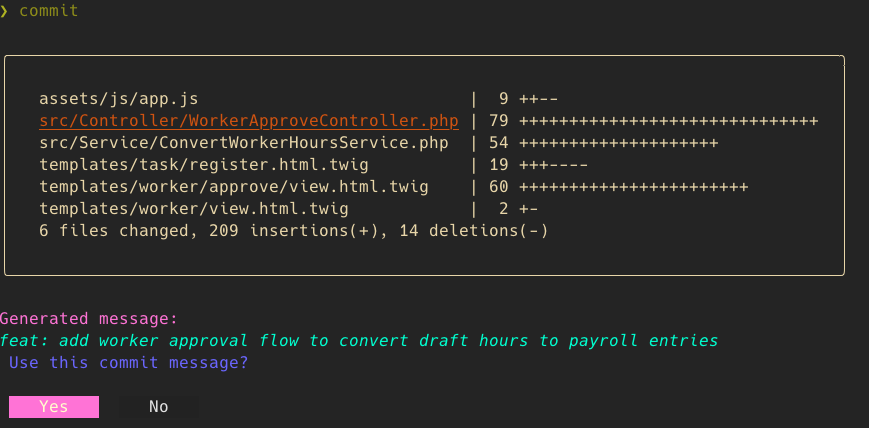
One of the most tedious tasks is to write git commit messages. So i wrote a little zsh function i can use within a git repository, that reads all the changes and suggest to you, a commit message. The script make use of Gum to make it all a bit more glamorous.
function commit() {
  commitMessage="$*"

  if gum confirm "Execute git add . ?" --default=No; then
    git add .
  else
    selected=$({ git diff --name-only; git ls-files --others --exclude-standard; } | sort -u | gum choose --no-limit --header "Select files to stage:")
    if [ -n "$selected" ]; then
      echo "$selected" | xargs git add
    fi
  fi

  if git diff --cached --quiet; then
    gum style --foreground 196 "Nothing staged. Aborting."
    return 1
  fi

  if [ "$commitMessage" = "" ]; then
    gum style --border rounded --padding "1 2" --margin "1 0" \
      "$(git diff --cached --stat)"

    diff_input=$(echo "=== Summary ===" && git diff --cached --stat && \
                 echo -e "\n=== Diff (truncated if large) ===" && \
                 git diff --cached | head -c 50000)

    commitMessage=$(echo "$diff_input" | gum spin --spinner dot \
      --title "Generating commit message..." -- \
      claude -p "Write a single-line commit message for this diff. Output ONLY the message, no quotes, no explanation, no markdown. Max 80 characters, prefix chore etc if valid.")

    gum style --foreground 212 --bold "Generated message:"
    gum style --foreground 86 --italic "$commitMessage"

    if gum confirm "Use this commit message?"; then
      git commit -m "$commitMessage"
      gum style --foreground 46 "✓ Committed successfully!"
    else
      commitMessage=$(gum input --placeholder "Enter commit message..." --value "$commitMessage")
      git commit -m "$commitMessage"
      gum style --foreground 46 "✓ Committed successfully!"
    fi
    return
  fi

  eval "git commit -a -m '${commitMessage}'"
  gum style --foreground 46 "✓ Committed successfully!"
}
This is how it looks